Screen size calculator
Calculate physical screen dimensions from diagonal size and pixel resolution. Find optimal viewing distances based on visual acuity and field-of-view angles.
Screen size
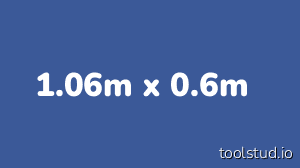
| Screen dimensions | mm | inch | foot | meter |
|---|---|---|---|---|
| Screen diagonal | 48" | 4ft | 1.22m | |
| Screen width | 41.8" | 3.49ft | 1.06m | |
| Screen height | 598mm | 23.5" | 1.96ft | 0.6m |
| Screen surface | 985 sq.in. | 6.84 sq.ft. | 0.64m² |
Pixel density
0.553 mm45.9 dpi (dots-per-inch)1.8 dpmm (dots-per-mm)Viewing distance
| Viewing distances | mm | inch | foot | meter |
|---|---|---|---|---|
| Minimum viewing distance max 70° viewing angle for full field-of-view experience | 759mm | 29.9" | 2.49ft | 0.76m |
| Visual Acuity minimum distance pixel < 1/60° so that individual pixels cannot be seen | 74.9" | 6.24ft | 1.9m | |
| Ideal viewing distance 30° viewing angle for full field-of-view experience | 78.1" | 6.51ft | 1.98m | |
| Maximum viewing distance min 26° viewing angle for full field-of-view experience | 90.6" | 7.55ft | 2.3m |
Examples
- Digital TV: 32" HD • 40" HD • 43" HD • 55" 4K UHD • 65" 4k UHD • 75" 8K UHD
- Ultrawide 4K: 34" gaming monitor • 49" gaming monitor
- Apple: 21.5" iMac • 27" iMac Retina • 27" 5K iMac Pro • 32" Pro Display XDR
- Digital cinema: 20ft 2K scope • 24ft 2K flat • 80ft IMAX Laser 4K
- Digital Signage (vertical): 55" Full HD portrait • 65" 4K portrait
- Apple Watch: 40mm Series 5 - 44mm Series 5
- IoT: 7" Raspberry Pi screen
Frequently Asked Questions
How is screen size calculated from diagonal?
Using the Pythagorean theorem: width = diagonal × cos(atan(height/width ratio)), height = diagonal × sin(atan(height/width ratio)). The aspect ratio determines how the diagonal splits between width and height.
What is the ideal viewing distance for a TV?
For a 30° field-of-view (recommended for immersive viewing), sit at a distance of about 1.6× the screen width. For 4K TVs, you can sit closer (1.2×) since pixels are smaller.
What does DPI mean for screens?
DPI (dots per inch) measures pixel density. Higher DPI means sharper images. Retina displays typically have 200+ DPI, making individual pixels invisible at normal viewing distances.
Why does aspect ratio matter?
Aspect ratio (width:height) affects how content is displayed. 16:9 is standard for HD video, 21:9 for ultrawide monitors, and 4:3 for older content. Mismatched ratios result in letterboxing or cropping.
